|
|
| |
|
Holdem Indicator Poker Calculator Features
|
| |
|
1. Main Screen
|
| |

|
| |

|
| |
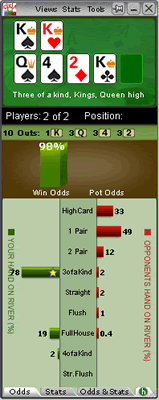
Vertical View
- Win Odds:
Holdem Indicator win poker odds are calculated with a sophisticated mathematical algorithm based on your pocket cards, the community cards, and the number of players in the hand. Holdem Indicator offers accurate win poker odds that you can trust. You can change the display format to "Ratio" in the settings window after you click "Tools" > "Settings".
- Pot Odds:
Pot odds is simply a ratio of the amount of money in the pot compared with how much money it takes to call. The higher the ratio, the better your pot odds are. If there are $12 in the pot and it costs $4 to call then you are getting 3:1 odds ("cost to stay in"). This can be translated to a percentage, representing the size of your contribution in the new pot. It will be 25% in the above example. You can change the display format in the settings window after you click "Tools" > "Settings".
- Hand Odds:
Holdem Indicator displays the probabilities of hitting a particular hand at showdown for you and your opponents at showdown. For example, if it shows 20 on flush for you and 30 for your opponents, it means that you have a 20% probability of getting your flush, while your opponents collectively have a 30% chance of hitting a flush.
- Starting Hands Strength:
Holdem Indicator provides EV, Sklansky Group/Rank and Win Odds for your starting hands. They're all independent numbers. You can choose the one you prefer to play your own starting hands.
- EV:
Expected Value for your hole cards. Expected value is the average amount of big bets this hand will make or lose. These statistics were compiled by a major online poker room from their database of millions of real live hands. So, for example, AA from the small blind in a 3/6 game will make on average 2.71 times the big blind, or $16.20 per hand (2.71 * $6). 22 from the button however, will make -0.12 EV, or -$0.72 in a 3/6 game (6 * -0.12). By only playing poker hands that have profitable EV, you will certainly improve your Texas Hold'em game. Please remember however, that this is a compilation of EV for the average player, so they are just representative of long term statistics and not Texas Hold'em facts. You will still need to play your poker hands accordingly, which means you need to observe your opponents, and play as the flop sees fit. Here are the Expected Value hand charts for 2 Players, 6 Players, 10 Players.
- Group/Rank:
This is another way to describe your hole cards' strength. In the book of Hold'em Poker for Advanced Players by David Sklansky, he divides the starting hands into 9 groups. This is a strategy book for limit Hold'em, but the starting hand groups do have some practical use in no limit Hold'em. Group 1 is the strongest; Group 9 is the weakest. You can get the whole list of the Sklansky Groups. For PokerStars and Full Tilt (only), we use "Rank" to indicate the absolute strength of your starting hand, 1-169, 1 is the best hand. Holdem Indicator converts it into percentage as "top %". You can get more information about the starting Hand Ranks.
- OUTs:
OUTs refer to the unseen cards still left in the deck that will improve your hand after the flop. As you might guess, the more cards left in the deck that will improve your hand, the better. That's why, after the flop, you want to stay with hands that can be improved in a number of ways. The more outs, or ways your hand can potentially improve on the Turn or the River, the better your chances are of winning the pot. By counting your outs, you can do a very rough, quick calculation to estimate your chance of improving your hand after the flop, and hopefully having a winning hand. Knowing how likely (or unlikely) you are to improve will help you make a better decision about how much (or little) to invest in the hand. Holdem Indicator shows you the total outs and what the outs are. Holdem Indicator displays the OUTs from the strongest to the weakest. So you can easily ignore the weak ones if you wish. Keep in mind that Holdem Indicator doesn't calculate Win Odds based on OUTs. They're independent. You can use either of them to judge your hand strength.
- Position:
Holdem Indicator shows your position after flop. For a full size table (7-10 players), the first three seats after the button would be Early. The button and the two seats before it would be Late, and in between is the Middle. For short-handed tables (5-6 players), Early and Late position are the first and last two positions. For tables with 2-4 players, Early and Late position are the first and last position.
- "h":
Click "h" to switch between "Current Session" and "History Data" for your player stats box.
- "+":
Click "+" to display player stats box in a separate window.
|
|
2. Player Stats
|
| |
|
| |
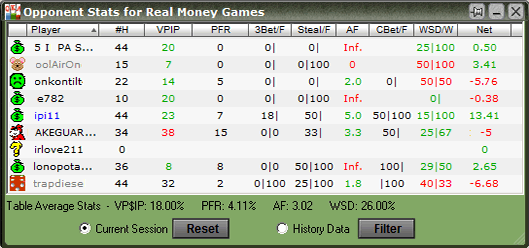
Holdem Indicator stores Player Stats automatically on your computer. The stats will be loaded automatically next time you're sitting with a tracked player (if you choose to display the history stats option). This data is collected using the same information you receive while sitting at the poker table. Holdem Indicator does this by reading the log files supplied by the online poker rooms themselves. The major difference is that Holdem Indicator actually remembers the action and automatically recalls it for you. Top professionals have amazing card memory - so can you!
Play money, real money, and tournament stats are tracked and displayed separately. You can change the stats display format in the settings window after you click "Tools" > "Settings".
In your Holdem Indicator installation folder, you can see a sub-folder named "Statistics", where the stats database file is located.
|
- You can choose which stats columns you prefer to display. "Right Click" on the stats window. Then select Select Columns to be Displayed.
- Player: If you click the header of this column once or twice, you can sort players by player name alphabetically or by seat positions on the game table.
- #H:
The total number of hands tracked.
- VPIP (Voluntary Put Money In Pot):
Percentage of games a player voluntarily puts Money in the pot pre-flop. Blinds do not count unless a player completes small blind or calls a raise or raises from either blind. It measures a player's tightness/looseness, which helps indicate the range of hands that the player will see a flop with. Green for Tight, Black for Neutral and Slightly Loose, Red for Loose. Below are the default settings.
| VPIP |
Category |
| VPIP < 24% |
Tight |
| 24% < VPIP < 28% |
Neutral |
| 28% < VPIP < 33% |
Slightly Loose |
| VPIP > 33% |
Loose |
- PFR: Pre-flop raise percentage.
- 3Bet/F: 3Bet pre-flop. % of times a player raises pre-flop when facing a raise. It includes 3Bet, 4Bet, 5Bet, etc.
/F: % of times a player folds when facing a 3Bet. It applies to the 1st raiser only. In case that hand is a 4bet hand eventually and the 1st raiser folds, it's not a "Folded to 3Bet pre-flop".
- Steal/F: % of time a player raises unopened pot pre-flop from the CO (Cutoff), Button and SB position. A steal can only be made if everyone in front of the stealer folds so that the stealer is making the first bet pre flop and only from the cutoff, button or small blind. If there is a limper in front and the steal position player raises, that is classed as "raising limpers" and not "stealing".
/F: % of times SB/BB folds when facing a steal.
- AF (Aggression Factor):
It measures a player's aggression/passivity, which represents the player's betting tendencies after the flop. Holdem Indicator provides a combined AF for flop, turn, and river. If a player makes some raises and bets but never calls, the AF will be displayed as Inf, which means "infinite". Red for Passive, Black for Neutral, Green for Aggressive. Below are the default settings.
AF = (Raise% + Bet %) / Call %
| AF Value |
Category |
| AF < 1 |
Passive |
| 1 < AF < 1.5 |
Neutral |
| 1.5 < AF |
Aggressive |
- CBet/F: Continuation bet on flop. % of time a player bets the flop after being the pre-flop raiser. A CBet can only be made when there are players to act before the pre-flop raiser, if those other players all check to the pre-flop raiser.
/F: % of time a player folds to a continuation bet on flop.
- WSD/W:
To further categorize players, we use "Went to Showdown %" to measure whether a player is Solid or Overplay. It is based on the hands when saw flop. Green for Solid, Red for Overplay. Below are the default settings.
| WSD% |
Category |
| WSD < 39% |
Solid |
| 39% < WSD |
Overplay |
/W: Went to Showdown and Won percentage.
- Net:
The chip amount that this player is up or down for all hands tracked. It is very interesting to observe how different playing styles (see VPIP, AF, etc) correlate with winning or losing patterns. Also, the balance may represent additional useful information regarding the player's current mindset (who is more likely to "play it safe", who is getting desperate, who is about to "go on tilt" etc).
- Profiling Icons: (This feature is unavailable for PokerStars and Full Tilt)
Holdem Indicator may assign a profiling icon to a player when it collects more than 40 (by default) hands of data for that player. Below is the list of all the profiling icons and the corresponding criteria. You can change the profiling thresholds in the lower part of settings window after you click "Tools" > "Settings".
 Calling Station (Slightly Loose, Passive). Calling Station (Slightly Loose, Passive). Voluntary Put Money in Pot % is between 28% and 33%; Aggression Factor is less than 1.00.
 Fishy (Loose, Passive/Neutral). Fishy (Loose, Passive/Neutral). Voluntary Put Money in Pot % is greater than 33%; Aggression Factor is less than 1.50.
 Gambler (Slightly Loose, Aggressive, Overplay). Gambler (Slightly Loose, Aggressive, Overplay). Voluntary Put Money in Pot % is between 28% and 33%; Aggression Factor is greater than 1.00; Went to Showdown % is greater than 39%.
 Good Player (Tight, Aggressive, Solid). Good Player (Tight, Aggressive, Solid). Voluntary Put Money in Pot % is less than 24%; Aggression Factor is greater than 1.50; Went to Showdown % is less than 39%.
 (Loose, Aggressive). (Loose, Aggressive). Voluntary Put Money in Pot % is greater than 33%; Aggression Factor is greater than 1.50.
 (Neutral, Aggressive, Overplay). (Neutral, Aggressive, Overplay). Voluntary Put Money in Pot % is between 24% and 28%; Aggression Factor is greater than 1.50; Went to Showdown % is greater than 39%.
 (Neutral, Aggressive, Solid). (Neutral, Aggressive, Solid). Voluntary Put Money in Pot % is between 24% and 28%; Aggression Factor is greater than 1.50; Went to Showdown % is less than 39%.
 (Neutral, Passive/Neutral). (Neutral, Passive/Neutral). Voluntary Put Money in Pot % is between 24% and 28%; Aggression Factor is less than 1.50.
 (Slightly Loose, Neutral). (Slightly Loose, Neutral). Voluntary Put Money in Pot % is between 28% and 33%; Aggression Factor is between 1.00 and 1.50.
 Rock (Tight, Passive, Solid). Rock (Tight, Passive, Solid). Voluntary Put Money in Pot % is less than 24%; Aggression Factor is less than 1.00; Went to Showdown % is less than 39%.
 (Slightly Loose, Aggressive, Solid). (Slightly Loose, Aggressive, Solid). Voluntary Put Money in Pot % is between 28% and 33%; Aggression Factor is greater than 1.50; Went to Showdown % is less than 39%.
 (Tight, Aggressive, Overplay). (Tight, Aggressive, Overplay). Voluntary Put Money in Pot % is less than 24%; Aggression Factor is greater than 1.50; Went to Showdown % is greater than 39%.
 (Tight, Neutral). (Tight, Neutral). Voluntary Put Money in Pot % is less than 24%; Aggression Factor is between 1.00 and 1.50.
 (Tight, Passive, Overplay). (Tight, Passive, Overplay). Voluntary Put Money in Pot % is less than 24%; Aggression Factor is less than 1.00; Went to Showdown % is greater than 39%.
 (Not sure yet). (Not sure yet). Not enough hands of data to categorize this player.
- Filters:
For the history stats, you can set up the criteria to display the preferred data. Click "Tools" > "History Stats Filters".
- Player Notes:
In the player stats window, double click on a player's name, you can add/edit or view notes for that player. On the HUD overlay, click the profiling icon. Once a player has notes, there will be a "sign" on the player name or the profiling icon. The notes data will be kept locally on your computer.
|
|
3. Mucked Hands at showdown.
|
| |
| |

|
| |
The "Mucked Hands" feature is available for Party Poker, EmpirePoker, Full Tilt, PokerStars, iPoker network, Cake Poker Network, 888 Poker, Merge Network.
Holdem Indicator reads the mucked hands information from the hand history files. If there are some mucked cards in a game, the poker client will write this information to the hand history file. Then Holdem Indicator will read and display them. Keep in mind that not every hand has the mucked cards.
For the "Mucked Hands" feature to work well, you need to enable the instant/local hand history option in your poker client and put the language to English.
|
| |
|
4. YOU HAVE THE NUTS ALERT.
|
| |

|
| |
|
5. Settings
|
| |
|
| |
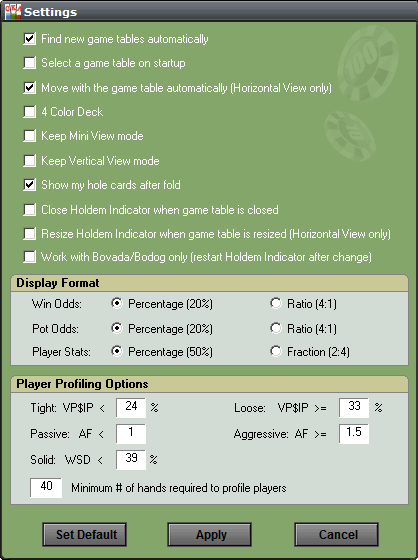
- Find new game tables automatically:
By checking this option, Holdem Indicator will launch new instances automatically for your new game tables.
- Select a game table to attach to on startup:
By checking this option, Holdem Indicator won't attach itself to any game table automatically. You need to manually select one of the game tables when you launch Holdem Indicator.
- Move with the game table automatically:
By selecting this option, Holdem Indicator will move itself with the game table automatically when you move your game table. For vertical and mini view mode however, this option is invalid.
- 4 Color Deck:
Displays your hole cards and the board cards with a 4 color deck on Holdem Indicator.
- Keep Mini View Mode, Keep Vertical View Mode:
So you don't have to change the view every time you launch Holdem Indicator.
- Show my hole cards after fold:
By selecting this option, Holdem Indicator will keep displaying your hole cards after you fold your hand.
- Close Holdem Indicator when game table is closed:
So you don't have to manually close Holdem Indicator every time.
- Work with Bovada/Bodog only:
Holdem Indicator will find Bovada/Bodog game tables only.
- Win/Pot Odds:
You can change the Win/Pot Odds display format to Percentage or Ratio.
- Player Stats:
Display the player stats data in fraction mode. For example, display "1 : 2" instead of "50%", which is more accurate in some cases. Here "2" is the total hands base.
- Player Profiling Options:
You can change the player profiling thresholds.
- Min # of hands required to profile players:
You can set the minimum number of hands required to profile a player. By default, the number is 40. You can try to set a bigger number to get more reliable results.
|
|
6. Player Stats Configuration
|
| |

|
| |
|
"Right Click" on the stats window, you can see some menu entries as above:
|
-
"Reset Current Session". If you click it, the player stats will be reset to 0 for the current session.
-
"Always Current Session for Me". If you select this option, Holdem Indicator will always display your own stats for the current session even you select "History Data" option.
-
"Grey Out Folded Players". By default, the name of folded players will be grayed out. You can disable this option.
-
"Select Columns to be Displayed". You can choose which stats columns you prefer to display.
|
| |
|
7. Manual Poker Calculator
|
| |
|
| |
|
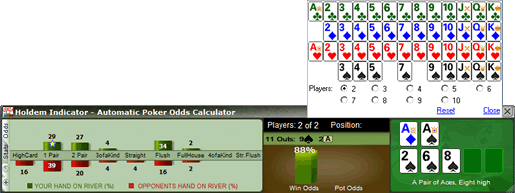
Click "Tools" > "Manual Calculator" or Double Click on the cards display area, you can launch the Manual Calculator.
During play, you even can replace one card to another by double clicking it.
|
| |
| |
|
8. Player Stats Assistant
|
| |
|
| |
|
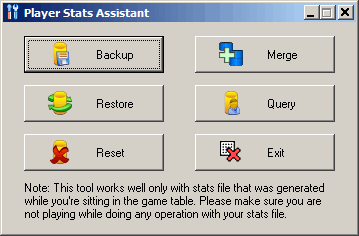
Click "Tools" > "Player Stats Assistant". You can use this tool to manage the stats database files, search the stats for a player offline, etc.
|
-
Backup: Backup your current stats information to a database file. So you can move the file to another computer or "Restore" the stats on the same computer after system reinstallation.
-
Merge: You can use the "Merge" function to merge stats from another computer: "Backup" the old stats from your old computer. Copy the database file to your new computer. Then you can "Merge" the old stats with the new one.
-
Restore: You can transfer/restore your stats information: "Backup" the current stats to a database file. Copy the file to a safe place. Then you can "Restore" it to the new installation.
-
Query: Search the stats for your own or for a particular player on a poker site. The search results will be displayed with one record each month. You can select and delete the stats for a particular month. You can also update the "Notes" for that player.
-
Reset: Delete all the stats information you collected.
|
|
9. Head-Up Display (HUD)
|
| |
|
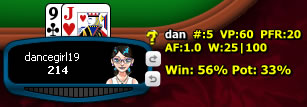
Holdem Indicator displays player stats, win/pot odds and mucked cards seamlessly on your game table. Holdem Indicator HUD is very easy to use. No complex configuration is needed.
|
| |
|
-
Right Click on the stats area, it will popup a menu with a bunch of options where you can configure your HUD settings, move the HUD seat positions, etc.
-
If you're using a different theme for your game table, the default HUD overlay might not be in the right positions. You can drag the stats to a proper location you prefer. The new positions will be remembered by HUD.
-
Move mouse over the player icon, it will display the description and notes (if any). Click the icon, you can edit notes for the player.
-
Move mouse over stats area, it will display the detailed stats for the player.
-
The 3 white characters match the first 3 characters of the player name. So you can tell whether the HUD positions are correct.
-
You can watch a video about this feature at http://www.youtube.com/watch?v=KYIAvoqw77k
|
|
10. Hand Replayer
|
| |
|
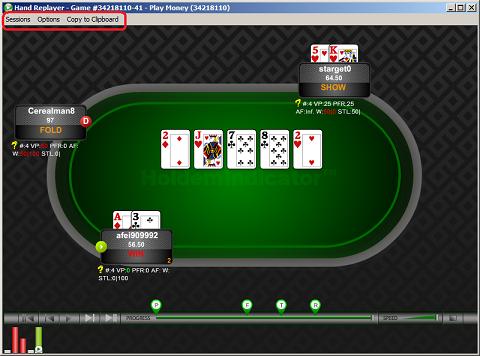
Click the "Replay" button or click "Tools" > "Hand Replayer". You can visualize hands you played with the Exact Player Stats and Win Odds (for yourself and players with known cards).
|
| |
|
-
"Sessions" Menu: Select a session to replay or delete an old session.
-
"Options" Menu: You can change a bunch of options to customize your Hand Replayer.
-
"Copy to Clipboard" Menu: Copy the information for your current hand. So you can email it or paste it a forum.
-
Double click on the seat of a player, you can view or edit notes for that player.
|
|
11. Stats Graphs
|
| |
|
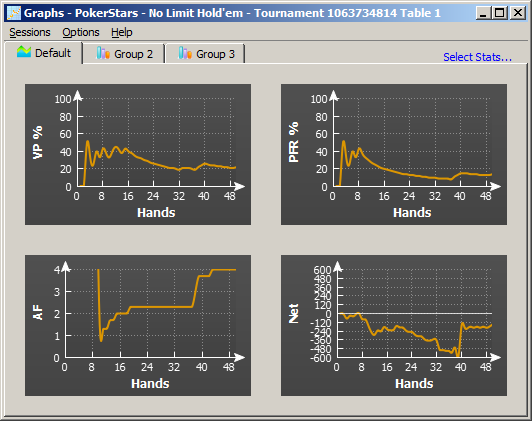
Click the "Stats Graphs" button or click "Stats" > "Stats Graphs". You can review your sessions with graphs.
|
| |
|
-
"Sessions" Menu: Select a session to review or delete an old session.
-
"Options" Menu: You can change a bunch of options to customize your Graphs.
-
"Select Stats..." Menu: You can select which stats to be displayed.
|
| |
| |
|
|